Ideally, Partner APIs should synchronously process our request and return a response immediately. This is the preferred way, which also reduces errors and confusion.
If necessary, our please reach out to us.
Here's an example for a Prescription Transfer Request.
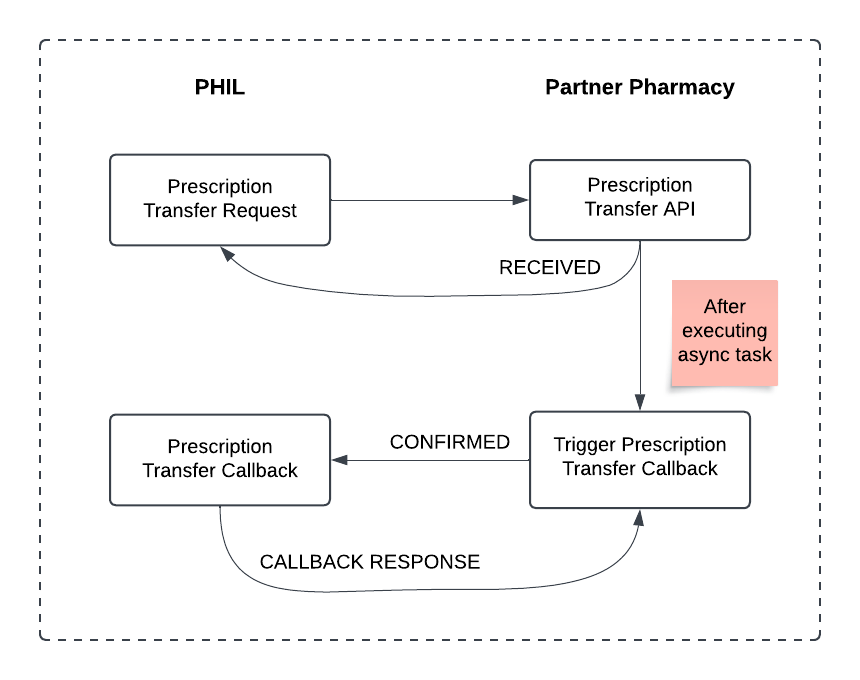
- PHIL sends a Prescription Transfer request to the Partner Transfer API.
- Partner returns
responseTypeasRECEIVED. - After some time, partner calls the Prescription Transfer Callback API with
responseTypeasCONFIRMED. - The callback API responds with either
RX_CALLBACK_SUCCESSorRX_CALLBACK_ERROR.
PHIL will wait for 4 hours before marking a request as missing a callback. In this scenario, PHIL assumes that the request failed.
To call our Callback APIs, specify the response data in the request. Here's an example for CONFIRMED:
{
  "requestID": "partner_reference_id",
  "metadata": {
    "referenceID": "partner_reference_id",
    "responseType": "CONFIRMED",
    "responseID": "partner_response_id",
    "responseTimestamp": "2024-09-11T13:55:00Z"
  },
  "prescription": {
    ...
  }
}
Once we received your Callback, there are two response types availbale:
| Response Type | Definition |
|---|---|
RX_CALLBACK_SUCCESS | The expected callback has been received and fully processed. |
RX_CALLBACK_ERROR | The received callback encountered an error. See error details for more info. |
If the callback processing encountered an error, the callback API will return error details.
{
  "requestID": "",
  "metadata": {
    "referenceID": "partner_reference_id",
    "responseType": "RX_CALLBACK_ERROR",
    "responseID": "partner_response_id",
    "responseTimestamp": "2024-09-11T12:26:00Z"
  },
  "error": {
    "type": "MISSING_INFO",
    "description": "could not map callback - requestID is missing."
  }
}
See Error Handling section for a list of possible error types. This response will also be flagged on our end to track the issue.